Musings of a Data professional

Stuart Moore

Author: Stuart Moore Page 10 of 18

Nottingham based SQL Server DBA who dabbles with many other technologies. 15+ years of experience with databases and still keen to learn and explore.

PowerShell module to automate restoring SQL Server backups

PowerShellI’ve long been a proponent of automatically restoring as many of your SQL Server backups as you can. There are many benefits of doing this, amongst them:

  • Checking your backups are working, I’ve seen people with backups they can’t restore
  • Knowing how long it will take to recover, your boss isn’t going to be happy if they’re still waiting 3 hours after you said the business would be back up and running
  • Having logs of having restore them, Auditors love this sort of thing
  • Peace of mind knowing that your restores are going to work when the brown stuff hits the reciprocating draught machine.

I’ve been using a collection of scripts and functions based on my previous blogs and presentations on the subjects. But they’ve never really been in a state that I felt comfortable sharing with the world.

Until now:

SQL Relay Nottingham 2016

SQL Relay logp

After a great time last year, we’re bring SQL Relay back to Nottingham on October 6th 2016.

We will have 3 tracks covering SQL Server, BI, and Analytics. There’ll be 3 tracks of 1hr sessions, plus a workshop track with half day sessions.

We’ll be covering a wide range of topics such as SQL Server performance, management, and development, Azure/Cloud technology, R, big data, cubes, reporting and dashboarding. These topics will be covered at a variety of levels so there’s something to suit everyone whether an accidental DBA, a hotshot BI pro, or a jack of all trades.

All of this for the princely sum of 0p! We’ll even provide lunch. You won’t get a better SQL Server training off in Nottingham in 2016

Speaker submissions are open if you want to speak. Closing date is 19th August

The timetable for the day should be out shortly after that.

Register to attend or speak here – Nottingham SQLRelay Registration

Deleting Large amounts of data in SQL Server – Part 2

In the last part (Part 1) we looked at a reasonably generic script for deleting large amounts of data from SQL Server that helps when you issue a delete statement and SQL Server just sits there with your transaction logs filling up and refusing to clear out.

This time, we’re going to look at how to deal with that wonderful error message of:

Msg 547, Level 16, State 0, Line 1
The DELETE statement conflicted with the REFERENCE constraint "FK__address__personi__239E4DCF". The conflict occurred in database "dbgrow", table "dbo.address", column 'personid'.
The statement has been terminated.

Which is SQL Server’s way of letting you know that the data you’re trying to delete is referenced as part of a Foreign Key relationship, so can’t be deleted unless you delete the record on the other end of the relationship.

So how do you work around this?

SQL Server, getting the size of table partitions with T-SQL

Needed to quickly tell someone how large the partitions on a CRM 2011 auditbase table were (neither of us had access to the nice CRM GUI to answer it (ah they joys of not being trusted!)). So if anyone else needs some thing similar this is what I came up with:

SELECT
part.partition_number,
sum(alloc.total_pages/128) AS TotalTableSizeInMB,
sum(alloc.used_pages/128) AS UsedSizeInMB,
sum(alloc.data_pages/128) AS DataSizeInMB
FROM sys.allocation_units AS alloc
INNER JOIN sys.partitions AS part ON alloc.container_id = CASE WHEN alloc.type in(1,3) THEN part.hobt_id ELSE part.partition_id END
LEFT JOIN sys.indexes AS idx ON idx.object_id = part.object_id AND idx.index_id = part.index_id
where part.object_id = object_id('auditbase')
group by partition_number

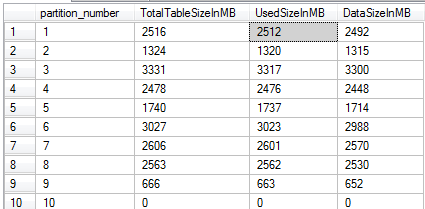
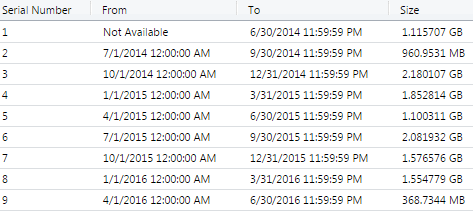
If you compare the numbers with thos provided by CRM you’ll notice a differece:
crm-part-size-sql

crm-part-size-crm

And that’s just because Dynamics CRM doesn’t include the space the indexes take up.

New-AzureRmAutomationCredential returning “Input string was not in a correct format”

Having banged my head against this misleading error message, I thought I’d post this.

it’s nothing to do with any of the parameters you’re passing in, believe me I checked.

It’s actually complaining that the Credential already exists! I was doing a redeployment and the credential hadn’t been removed.

And in other useful annoyances, Find-AzureRmResource doesn’t work for Automation Credentials. So now my deployment scripts looks like this:

if ((Get-AzureRmAutomationCredential -ResourceGroupName $rgname  -name "meadmin" -AutomationAccountName $AutoName)){
    Remove-AzureRmAutomationCredential -ResourceGroupName $rgname  -name "meadmin" -AutomationAccountName $AutoName 
  }

New-AzureRmAutomationCredential -AutomationAccountName $autoname -ResourceGroupName $rgname -name "meadmin" -Value $acred -Verbose

The term ‘Test-AzureResource’ is not recognized as the name of a cmdlet, function, script file, or operable program

Microsoft have followed through with the deprecated warning on Test-AzureResource and it’s finally been removed. So there’s now a lot of PowerShell scripts out there that no longer work.

A quick alternative that involves nothing more than a search and replace (at least in my scripts so far!) is Find-AzureRmResource, behaviour is the same returning $FALSE if the Azure resource doesn’t exist and $TRUE if it does. So this snippet:

    if (!(Test-AzureRMResource `
        -ResourceName $vmName `
        -ResourceType "Microsoft.Compute/virtualMachines" `
        -ResourceGroupName $rgName)) {

can simply be replaced with:

    if (!(find-AzureRMResource `
        -ResourceName $vmName `
        -ResourceType "Microsoft.Compute/virtualMachines" `
        -ResourceGroupName $rgName)) {

and everything’s good.

Using Powershell to push registry fixes around multiple machines

PowerShellNeeding to push this (Microsoft KB 911272 around a bunch of web servers in a hurry. Luckily, thanks to 2 good design decisions:

  • Enabling PS remoting
  • A sane machine naming convention of the form server-1, server-2

We could push the change around with a small bit of Powershell:

$ccred = Get-Credential

$ScriptBlock={
    New-ItemProperty "HKLM:\Software\Microsoft\ASP.NET" -Name "FCNMode" -Value 1 -PropertyType "DWord" 
    New-ItemProperty "HKLM:\SOFTWARE\Wow6432Node\Microsoft\ASP.NET" -Name "FCNMode" -Value 1 -PropertyType "DWord" 
    iisreset
    }

$i=1
while ($i-lt 9){
    $cname = "app-prod-web-$i"
    Invoke-Command -ComputerName $cname -ScriptBlock $ScriptBlock -Credential $ccred
    $i++
}

We grab some credentials for the remote boxes (remember, seperate accounts for desktop and server admin duties is a GOOD idea).

As we’re passing through multiple commands/lines to Invoke-Command using a scriptblock is the easiest way, so create one of those. Quickly use New-ItemProperty to add the required DWORD values under the right keys, and then an iisreset to make sure they take affect.

A nice quick and dirty while loop allows us to push the scriptblock to the 8 servers in this set, and we’re done. A quick change of the $cname variable and I can push it to the next set as well. And another edit and it’s pushed into the staging environments as well.

Nottingham SQL Server User group begins

After many successful years running in Leicester we’re proud to announce that the PASS East Midlands chapter is moving to Nottingham for 2016.

Gavin had been running the group since it’s birth, but has now handed the reigns over to myself and Tobiasz. As we’re both based in Nottingham we have decided to move the SQL User group to Nottingham. With the response we had for Nottingham’s first SQL Relay event we wanted to build on that, and this also makes it more accessible with Nottingham’s connections to the rest of the East Midlands and Lincolnshire area.

We’re going be based at Capital One’s Trent House on Station Street, easy to get to from Derby, Leicester, Loughborough, Lincoln, Sheffield and all parts of Nottingham

We have 4 SQL Server User group dates lined up for next year:

As with all PASS SQL User groups there is no charge for attending, yep, that’s free training! We’ll even provide some food and drinks while you learn!

Myself and Tobiasz are speaking at the first event, and we’re currently lining up some great home and international speakers for the other sessions.

But we’d love to hear from you if there’s any particular topics you’d like covering, I’m happy to go out and find speakers covering areas of special interest to our members. Also let us know at what level you’d like sessions presented, if you want an introduction to a particular topic that’s great, as is wanting a level 500 brain warper from the likes of Bob Ward!

All details for future meetings will be posted via our Meetup page – .

Please register with the meetup group to keep up to date. You’ll also need to register for the event to attend. This is because we need to provide Capital One with a list of names to be signed in at security, so if you haven’t registered then you won’t be allowed in I’m afraid.

Look forward to seeing some of you there. Please post any comments here or at

SQL Relay bringing free SQL Server Training to Nottingham

sqlrelaylogo70Having spoken at the last couple of SQL Relays, I’m very happy to announce that in 2015 we’re visiting Nottingham for the first time.

On the 7th October SQL Relay will be at the Nottingham Albert Hall conference center.  Speaker submissions are now coming in (and if you fancy speaking, please submit a session), and we hope to release the full lineup early in August. Based on previous years there will a wide range of high quality presenters.

At Nottingham we will be having 4 tracks on the day:

  • SQL Server
  • Business Intelligence
  • Business Analytics
  • Workshops provided by our sponsors

Across these we’ll be covering topics such as SQL Server performance, management and development, Azure/Cloud technology, R, Big Data, Cubes, Reporting , Dashboarding and much more.

If you’re a SQL Server DBA, then this could be a great opportunity to pick up some Business Intelligence crossover training. Or for a Business Intelligence developer, find our how to use Big Data solutions (on Azure, without the hardware costs) to analyse your data even further.

All of this great SQL Server content is available for the princely sum of Nothing. That’s right, its free, and we’ll even provide you with lunch.

We’re open for registrations, so sign up today and look forward to some quality free SQL training in Nottingham

If you’ve any questions, then please ask them.

Finding the bottom folders of a file tree using PowerShell

There’s a simple way of getting Powershell to tell you the last folder in a known path:

$path = \\server\share\folder1\folder2\folder3
$folder = Split-Path $path -Leaf

and that’s all you need.

Now, how do you go about doing that if you don’t know the path ahead of time? That is, you have a large collection of directories, and all you want are those folders than make up the bottom levels of the branches. In this graphic it would be all the folders underlined.

Example of bottom folders

As an example, current $EMPLOYER holds backups from all SQL databases on a share, with each database’s backups being in a folder. Due to various DBAs over the years the depth of the tree to the actual backups isn’t fixed. So I need to find the “bottom” folder so I can process the backup files in there.

Well, that’s a little trickier. So lets have a look at a couple of ways of doing that:

Page 10 of 18

Powered by WordPress & Theme by Anders Norén